Live presenting scripts: your complete performer's guide

A live-presenting script is a run-of-show plus a timed speaking script that maps every moment of your event: who speaks, what they say, when slides advance, and what happens if the tech fails. Before you write a single word, decide two things: your CTA and your total run time. Every timing decision that follows anchors to those two numbers.
Here is what a strong live-presenting script gives you at a glance:
- A run-of-show file: timeline, roles, tech cues, and contingency notes
- A speaking script: slide-by-slide text, signpost phrases, and delivery cues
- Timing markers so you never overrun or leave dead air
- A clear CTA embedded at the right emotional moment, not bolted on at the end
Nancy Duarte's research shows that the most persuasive talks oscillate between the present reality and a better future state, building emotional momentum toward that CTA. Start there, and the rest of the script writes itself.
Table of Contents
- Do scripts really make you sound wooden?
- What does a live-presenting script actually contain?
- How do you write the speaking script itself?
- Ready-to-use script templates and timing breakdowns
- How should you rehearse a live-presenting script?
- How do you handle Q&A and live audience interaction?
- Which tools make delivering a live script easier?
- A short live-presenting script with acting delivery notes
- Key takeaways
- An actor's perspective on live presenting
- Work with Sofiavicedomini on your next live event
- Useful sources and further reading
- FAQ
Do scripts really make you sound wooden?
The single biggest myth stopping presenters from using a proper script is that it kills spontaneity. It does the opposite, when you use it correctly.
A well-rehearsed script frees your attention. Instead of searching for the next word, your mind is free to read the room, adjust your pace, and respond to the audience. That is exactly how actors work: the lines are memorised so the performance can be present.
"The script is not the cage. The script is the skeleton. Once it is inside you, you can move freely around it — and that is when the audience feels something real."
The practical benefits are concrete. Consistent CTAs mean your conversion language is identical across every run of the same webinar. Smoother transitions reduce the cognitive load on your audience. Easier rehearsal means you can run timed practice sessions and know, to the minute, whether your content fits the slot. And when something goes wrong live, a script gives you a recovery anchor: you know exactly where you are and where you are going next.
Platforms that use well-structured webinar scripts with front-loaded value and regular engagement prompts report higher audience retention throughout the session.
The rehearsal-to-confidence correlation is equally clear: presenters who rehearse from a written script consistently report lower pre-show anxiety than those who improvise from bullet points alone.
What does a live-presenting script actually contain?
Every strong presentation script lives in two separate files. Keeping them separate is not pedantic; it prevents the most common live disaster, which is reading your run-of-show cues aloud to the audience by accident.
The run-of-show
This is your production document. It lists every moment in chronological order with the person responsible, the exact clock time, and the tech action required.
| Column | What it contains |
|---|---|
| Time | Clock time or elapsed minutes (e.g. T+02:00) |
| Who | Presenter name, tech operator, or moderator |
| Action | What happens: slide advance, poll launch, video play, handover |
| Contingency | What to do if the action fails (backup slide, verbal bridge) |
The speaking script
This is your performer's document. It contains key talking points, visual cues, and a structured outline to guide delivery, plus:
- Slide-by-slide or section-by-section speaking text
- Signpost phrases marking transitions (more on these in the next section)
- Timing markers, e.g. (2 min) at the top of each block
- Audience prompts: poll launches, chat questions, name-checks
- Delivery notes in parentheses: (pause), (look up), (emphasis)
A typical webinar run-of-show template moves through these segments in order: pre-show warmup, opening hook, agenda reveal, three content blocks, demo or case study, Q&A facilitation, CTA, and close. That sequence is not arbitrary; each segment earns the next one.
How do you write the speaking script itself?
Start with the CTA and write backwards. Define the exact action you want the audience to take, then design each content section to create the gap that makes that action feel obvious. This is the structural principle behind Nancy Duarte's talk architecture: show what is, then show what could be, and the audience moves toward the CTA on their own momentum.
Timing and pacing
A comfortable spoken delivery rate sits at roughly 125–150 words per minute for a live presentation, and slightly slower, around 110–120 words per minute, for a teleprompter read where clarity matters more than energy. At this pace, a 20-minute presentation script typically contains about 2,600 words.
Mark each section with its target duration at the top of the block. If a section runs long in rehearsal, cut from the middle, not the end; the CTA and close must stay intact.
Writing for the voice, not the page
Short sentences work better on a teleprompter than long, subordinated ones. Use natural contractions (you're, we've, it's) because they match how a human voice actually sounds. Add parenthetical delivery notes sparingly but deliberately: (pause after this line), (slow down here), (direct eye contact with camera).
Pro Tip: Borrow the actor's technique of breaking your script into "beats": a beat is a single unit of intention, one thing you want the audience to feel or understand. When each paragraph has one clear beat, the delivery becomes instinctive and the words stop feeling scripted.
AI tools such as SlideScript can convert a slide deck into a timed, word-for-word draft in minutes. They are genuinely useful for a first pass, but always follow with a human edit that adjusts rhythm, adds performance cues, and restores your natural voice.
Ready-to-use script templates and timing breakdowns
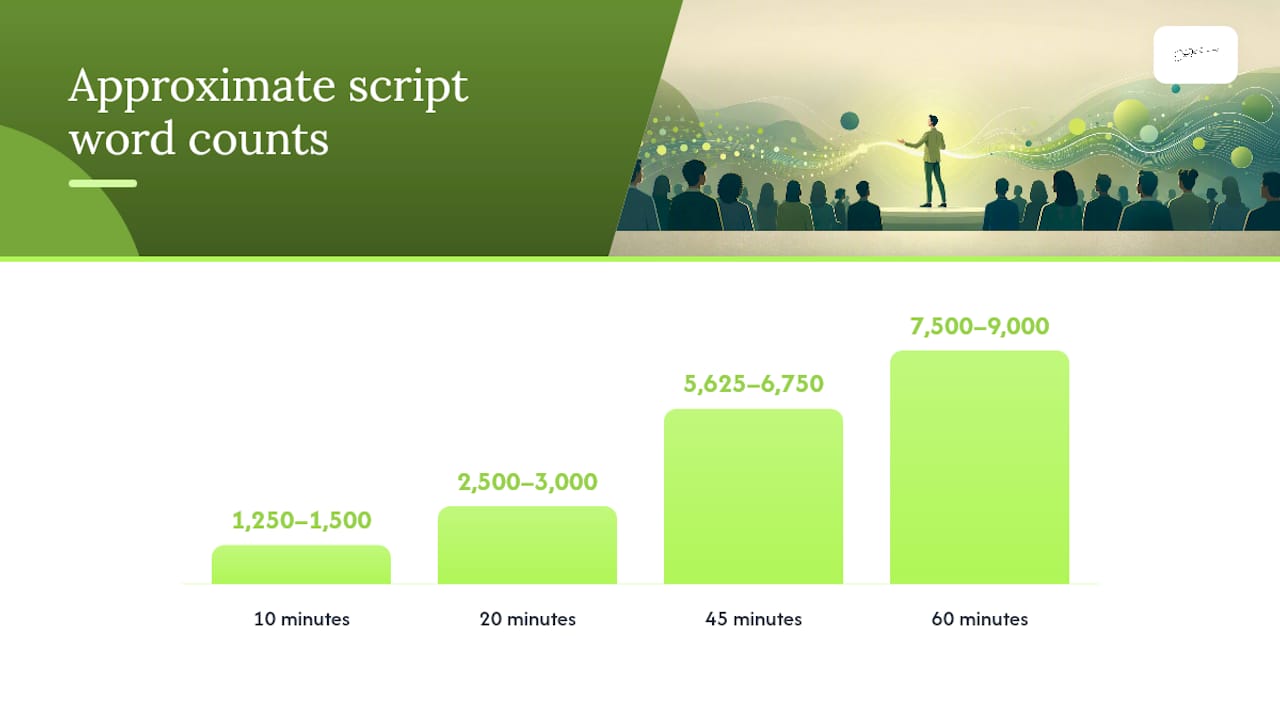
The format of your script depends on the session length and delivery method. Here is a timing reference for the most common slots, based on webinar timing guidelines:
| Session length | Approx. word count (125–150 wpm) | Suggested segment split |
|---|---|---|
| 10 minutes | 1,250–1,500 words | Hook (2 min), 2 content blocks (6 min), CTA + close (2 min) |
| 20 minutes | 2,500–3,000 words | Hook (3 min), 3 content blocks (13 min), CTA + close (4 min) |
| 45 minutes | 5,625–6,750 words | Pre-show (5 min), hook (3 min), 3 content blocks (25 min), Q&A (8 min), CTA + close (4 min) |
| 60 minutes | 7,500–9,000 words | Pre-show (5 min), hook (3 min), 3 content blocks (30 min), Q&A (15 min), CTA + close (7 min) |
Teleprompter layout vs. speaker notes layout
Use a full teleprompter-ready script when you are presenting solo to camera with no live audience interaction, such as a pre-recorded webinar or a streamed keynote. Use speaker notes layout (key phrases plus delivery cues, not full sentences) when you are facilitating a live Q&A or panel, where you need to look up and respond in real time.
Slides are visual aids, not teleprompters. Keep slide headlines to 3–6 words and place all detailed text in your speaker notes or teleprompter feed.
Snippet examples
60-second opening hook: "Three years ago, I walked onto a stage in front of four hundred people with no script and no safety net. I got through it. But I left value on the table — because I had no CTA ready, no timing anchor, and no recovery plan. Today I am going to give you the exact framework I use now, so you never have that feeling."

30-second transition: "So that is the problem clearly laid out. Now let me show you what changes when you apply this approach — and I promise the shift is faster than you expect."
20-second CTA: "If this resonates, the next step is simple: [action]. The link is on your screen right now, and I will drop it in the chat as well."
How should you rehearse a live-presenting script?
Rehearsal is where the script becomes performance. The goal is not to memorise every word; it is to internalise the structure and the beats so that delivery feels natural even when something unexpected happens.
A one-week rehearsal plan for a 45-minute webinar
- Day 5: — Full dress rehearsal on the actual platform (Ecamm Live, Zoom, or equivalent). Test audio, screen sharing, and teleprompter feed.
Dress rehearsal and tech checklist
- Camera framing: eyes level with the top third of the frame
- Microphone: test at presentation volume, not conversational volume
- Lighting: key light in front, no window behind you
- Slide advance: confirm the clicker or keyboard shortcut works in the platform
- Teleprompter feed: scroll speed set and tested at your delivery pace
- Backup: local copy of slides and script saved offline
Pro Tip: Use the actor's "cold read" technique on Day 1: read the script aloud without stopping to correct yourself. Every stumble is a signal that the sentence needs rewriting, not more memorisation. The script should feel like your own words, not a document you are reading.
Platforms report that polls placed every 8–10 minutes and visual changes every 2–3 minutes keep engagement higher throughout a session. Build those cues directly into your run-of-show so they happen on schedule, not as afterthoughts.
How do you handle Q&A and live audience interaction?
Q&A is the section most presenters under-script, and it shows. Prepare it with the same rigour as your content blocks.
Seeding backup questions
Write 5–7 backup questions before the event. These serve two purposes: they fill silence if no questions come in, and they model the quality of question you want the audience to ask. Frame them as "A question I often get is..." so they feel organic.
- Keep backup questions short and answerable in 60–90 seconds
- Assign a moderator to filter chat and surface the best questions
- Decide in advance who handles follow-up (direct message, email, resource link)
Scripts for common live interruptions
Technical cut: "It looks like we have a brief technical pause. Bear with me one moment — while we sort that, take a look at [slide/resource on screen]."
Off-topic question: "That is a great question and slightly outside today's scope. I would love to answer it properly, so let me follow up with you directly after the session."
Hostile challenge: "I appreciate you raising that. My experience has been [X], and I am happy to share the reasoning behind it. Let's take that conversation offline so we can give it the time it deserves."
Threading chat into your narrative
Name-check participants when they contribute something useful: "Great point from [Name] in the chat — that connects directly to what I was just saying about..." This creates a sense of live co-creation and keeps the audience invested.
Which tools make delivering a live script easier?
The right tools reduce friction between your script and your audience. Keep the setup minimal and test everything before the day.
Essential tool categories
- Teleprompter: PrompterOne / PrompterLive is a browser-based studio that keeps the same script across editing, rehearsal, and live reading. It preserves pacing metadata (scroll speed, focal-line position) so you never need to reformat between rehearsal and show day.
- Streaming platform: — Ecamm Live is well-suited to webcam-based webinars and live streams; it integrates with most major platforms and supports scene switching without disrupting the teleprompter feed.
- Grammar and clarity: Run your script through Grammarly before the final rehearsal. It catches sentence-level issues that read fine on the page but trip the tongue in delivery.
- Unified run-of-show: OneShow connects script, running order, and prompter feeds in one pipeline so a last-minute text edit propagates everywhere, removing the risk of reading from an outdated version live.
- AI draft generation: — SlideScript converts slide decks into timed, word-for-word scripts. Use it for a first draft, then edit for rhythm and performance cues.
Quick-setup checklist (30 minutes before going live)
- Log in to your streaming or webinar platform and confirm presenter permissions
- Open your teleprompter feed and confirm scroll speed
- Advance through all slides once to confirm order and animations
- Test microphone at presentation volume
- Check camera framing and lighting
- Confirm your CTA link is live and accessible
- Save a local backup of your script and slides
A short live-presenting script with acting delivery notes
Here is a practical sample script for a 2–3 minute opening. Use it as a template for any live event or webinar introduction.
[PRE-SHOW NOTE: Camera on, smile, settle. Breathe. You are ready.]
"Good [morning/afternoon/evening], everyone. My name is [Your Name], and I am genuinely glad you are here today." (pause — let the welcome land)
"In the next [X] minutes, I am going to show you [specific outcome]. Not the theory. The actual steps." (emphasis on 'actual steps' — slow down slightly)
"Before we begin, a quick question for you in the chat: [relevant question]. While you type, let me give you a little context." (look left, as if addressing the chat panel)
"[Content beat one: the present problem, stated plainly and personally.] (pause) [Content beat two: the better future state — what becomes possible.] (look directly at camera)
"Which is exactly why today matters. And here is what we are going to do about it." (transition into agenda)
Scaling this script
To expand to 10 minutes, add two more content beats between the hook and the CTA, each with its own signpost phrase and a 90-second timing marker. For 20 minutes, add a case study or demonstration block after the third content beat, and build in a poll prompt at the midpoint.
For teleprompter delivery, break every sentence onto its own line and add a blank line between paragraphs. This gives your eyes a natural reset point and prevents the rushed, run-together delivery that teleprompter beginners often fall into.
Delivery checklist for the narrator
- Vocal warm-up: three minutes of lip trills and tongue twisters before going live
- Breathing: inhale before each new section, not mid-sentence
- Physical anchor: feet flat on the floor, shoulders back, weight even
- Camera angle: lens at eye level or very slightly above
- Hands: visible in frame, resting naturally, ready to gesture on emphasis points
Key takeaways
A strong live-presenting script combines a run-of-show production file with a timed speaking script, and the two together give you control over timing, delivery, and audience engagement from the first word to the final CTA.
| Point | Details |
|---|---|
| Start with the CTA | Define the audience action first, then write content that creates the gap toward it. |
| Use two separate files | Keep the run-of-show (production cues) separate from the speaking script (delivery text). |
| Pace at 125–150 wpm | A 20-minute presentation script will usually range from 2,500 to 3,000 words at this rate. |
| Rehearse in stages | A one-week plan with cold reads, micro-bursts, and a full dress rehearsal builds confident delivery. |
| Sofiavicedomini's approach | Bespoke scriptwriting and on-camera rehearsal coaching that applies theatrical technique to live and webinar presenting. |
An actor's perspective on live presenting
Most presenters treat the script as a crutch and the performance as the real thing. I think that is the wrong way round. The script is the performance, written in advance. When you approach it the way an actor approaches a role — with beats, objectives, and subtext — the words stop being words and start being intentions. The audience feels the difference immediately.
What I have found, both on stage and in front of a camera, is that the presenters who struggle most are the ones who half-prepare. They know the content but have not decided what they want from each moment. A strong script forces that decision. Every section has a purpose: to inform, to shift belief, to create desire, to prompt action. When you know the purpose, the delivery follows.
The teleprompter is not a shortcut; it is a precision instrument. Rehearsing with it teaches you to speak at a consistent pace, to breathe in the right places, and to keep your eyes forward rather than buried in notes. Combine that with the stage instincts you build through repeated live performance, and you have something genuinely reliable: a presenter who can handle anything the live environment throws at them, because the script has already accounted for it.
Work with Sofiavicedomini on your next live event
If you are preparing for a keynote, a webinar, or a live-hosted event and you want a script that performs as well as it reads, Sofiavicedomini offers bespoke scriptwriting and on-camera rehearsal coaching built on real theatrical craft. The service covers a full run-of-show, a teleprompter-ready speaking script, and structured rehearsal sessions that prepare you for the unexpected, not just the planned.
The difference from a generic template is the performance layer: delivery cues, emotional beats, and vocal pacing notes written into the script itself, so you are not just reading words but inhabiting them. Whether you are hosting a 20-minute product webinar or a 60-minute live conference session, the approach scales to your format and your voice.
To find out more or request a booking, visit sofiavicedomini.me and get in touch directly.
Useful sources and further reading
The sources below are the most useful starting points for templates, signpost language, timing frameworks, and tool documentation.
| Source | What it contains |
|---|---|
| Signpost language phrase bank | A downloadable PDF of transition phrases organised by function: structuring, illustrating, summarising, and directing. |
| Nancy Duarte: TED Talk on talk structure | The talk that explains the "what is / what could be" oscillation framework for persuasive presentations. |
| Ecamm Live webinar script template | A practical run-of-show template covering pre-show through close, with notes on hooks and Q&A facilitation. |
| Sheridan College: writing a presentation script | A concise academic guide to what a presentation script should include: talking points, visual cues, and structured outline. |
| 45 and 60-minute webinar timing breakdowns | Segment-by-segment timing templates for 45- and 60-minute webinars, with poll cadence and engagement guidance. |
| SlideScript AI script generator | Converts slide decks into timed, word-for-word scripts; best used for first drafts followed by a human performance edit. |
| PrompterOne / PrompterLive | Browser-based teleprompter studio that preserves pacing metadata across editing, rehearsal, and live delivery. |
| OneShow unified run-of-show | Connects script, running order, and prompter in one pipeline; edits propagate to all outputs instantly. |
FAQ
Is it acceptable to use a script while presenting?
Yes. A well-rehearsed script improves timing, consistency, and delivery confidence. The goal is to internalise the structure so the script supports rather than constrains your performance.
What is a good presentation script?
A good presentation script includes a clear opening hook, signpost phrases at every transition, timed content blocks, audience interaction prompts, and a CTA written before the content sections. It reads like natural speech, not a document.
How long should a 20-minute presentation script be?
At a delivery rate of roughly 125–150 words per minute, a 20-minute presentation script will typically contain between 2,500 and 3,000 words.
What is the 5-5-5 rule for presentations?
The 5-5-5 rule is a slide design guideline: no more than five words per line, five lines per slide, and five text-heavy slides in a row. It keeps slides as visual anchors rather than reading material, which is why your full script belongs in speaker notes or a teleprompter feed, not on the slide itself.
How do you structure a live event script for a webinar?
A webinar script typically follows this sequence: pre-show warmup, opening hook, agenda reveal, three content blocks, a demo or case study, Q&A facilitation, CTA, and close. Each segment should have a timing marker and at least one signpost phrase to guide the audience through the transition.